
Preparing a 3D model for printing usually starts with a slicer. Traditionally, that means downloading an application, installing it on your computer, configuring your printer, and keeping the software updated.
But what if you could skip the installation entirely?
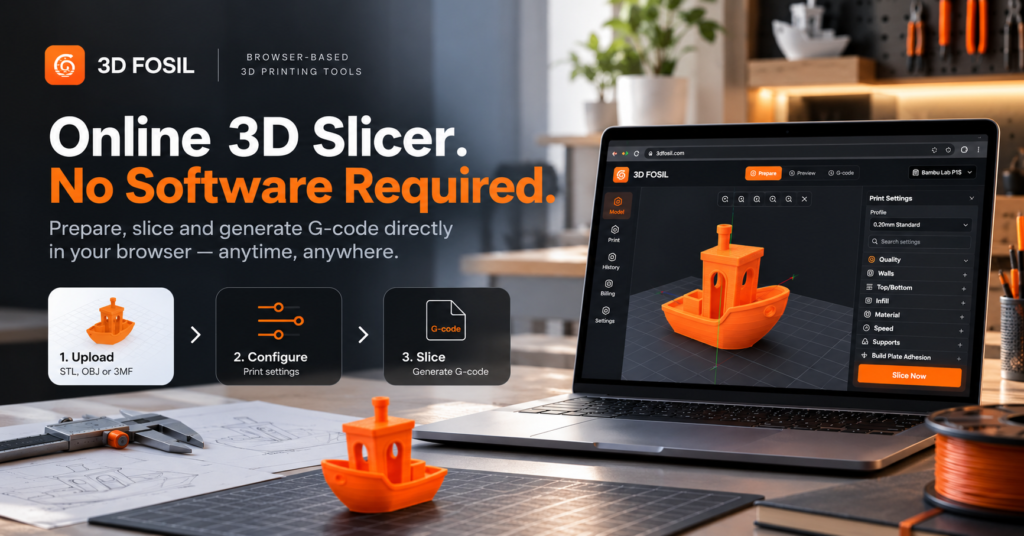
With an online 3D slicer, you can prepare your models and generate G-code directly from your web browser.
No desktop application to install. No software updates to manage. Just open your browser, upload your model, configure your printing settings, and start slicing.
In this guide, we’ll explain how online 3D slicing works, why browser-based tools are becoming a practical option for 3D printing, and how you can use 3D Fosil to prepare your next print.
What Is an Online 3D Slicer?
An online 3D slicer is a browser-based tool that converts 3D models into G-code without requiring a traditional desktop slicer installation.
A slicer takes a digital 3D model and divides it into horizontal layers. It then calculates the movements, extrusion commands, and other instructions required by a compatible 3D printer.
The resulting G-code tells the printer how to manufacture the object, layer by layer.
Traditional slicers, such as Cura and PrusaSlicer, are installed on your computer. Online slicers provide access to similar core preparation tasks through a web interface.
The main difference is how you access the software.
Instead of launching a locally installed application, you open a website and work directly in your browser.
Why Use an Online 3D Slicer?
Browser-based slicing offers several practical advantages, particularly for users who value accessibility, convenience, and a simpler workflow.
1. No Software Installation Required
One of the biggest advantages of an online slicer is that you don’t need to download or install a desktop application.
Traditional slicing software may require:
- Downloading installation packages
- Checking operating system compatibility
- Completing the installation process
- Configuring application settings
- Managing future software updates
With an online slicer, you can access the available tools through a compatible browser.
This can be especially useful when you’re working on a computer where installing additional software is inconvenient or restricted.
With 3D Fosil, you can open the platform and access its browser-based slicing tools without installing a dedicated desktop slicer.
2. Access Your Slicer From Different Computers
Desktop slicing applications are installed on specific devices.
If you regularly switch between a desktop computer and a laptop, you may need to maintain the software on multiple machines.
An online slicer offers a more flexible approach.
You can access the platform from different computers using a supported browser and an internet connection.
This is particularly useful for makers, designers, and engineers who work in different environments.
Whether you’re preparing a prototype at your office or reviewing a model from another computer, browser-based access can make your workflow more convenient.
3. Reduce Software Maintenance
Desktop applications require occasional updates to introduce new features, fix bugs, and maintain compatibility.
While these updates are important, managing them can interrupt your workflow.
Browser-based platforms can deliver application updates centrally.
This means users generally don’t need to download and install a new desktop version whenever the platform is updated.
For people who prefer a straightforward workflow, this can be a significant convenience.
4. Simplify Your 3D Printing Workflow
Preparing a model for printing involves more than generating G-code.
You may also need to:
- Inspect the model
- Check its dimensions
- Identify potential geometry issues
- Select a printer
- Configure printing parameters
- Estimate material usage
- Calculate printing time
- Generate the final G-code
Using separate tools for these tasks can make the process more complicated.
3D Fosil brings STL analysis and online slicing together in one browser-based platform.
This allows you to review your model and prepare it for printing without moving between unrelated applications.
5. Prepare Prints Without Depending on a Specific Desktop Operating System
Traditional slicers are distributed as applications for supported operating systems.
Depending on the software, compatibility and installation requirements may differ between Windows, macOS, and Linux.
Browser-based tools reduce this dependency.
Instead of installing an operating-system-specific application, you access the slicing interface through a compatible web browser.
This doesn’t mean every browser or device will offer identical performance, but it provides a more flexible way to access slicing functionality.
How Does Online 3D Slicing Work?
The underlying purpose of an online slicer is the same as that of a desktop slicer: converting a digital model into instructions that a 3D printer can execute.
The process generally involves six steps.
Step 1: Upload Your 3D Model
Start by opening the online slicer and importing your model.
STL is one of the most commonly used file formats in 3D printing.
An STL file describes the surface geometry of a 3D object using a collection of triangles.
Once imported, the model can be displayed in a 3D workspace.
Step 2: Select Your 3D Printer
Different printers have different specifications.
For example, printers may vary in:
- Build volume
- Nozzle diameter
- Supported materials
- Motion systems
- Firmware requirements
Selecting the correct printer profile helps establish the appropriate slicing configuration.
3D Fosil provides profiles for supported 3D printers, making it easier to start with an existing configuration.
Step 3: Configure Your Printing Settings
Before slicing, you need to define how the printer should manufacture the object.
Common slicing parameters include:
Layer Height
Controls the thickness of each printed layer.
Smaller layer heights generally produce finer vertical detail but may increase printing time.
Wall Thickness
Determines the thickness of the model’s outer walls.
Wall configuration can influence the strength and durability of the printed object.
Infill Density
Controls how much material is used inside the model.
Lower infill percentages generally reduce material consumption, while higher values may increase structural support.
Print Speed
Influences how quickly the printer performs its movements.
Appropriate speeds depend on the printer, material, and desired print quality.
Supports
Support structures may be necessary for certain overhangs or complex geometries.
The appropriate configuration depends on the model and printer capabilities.
Step 4: Position Your Model
Model orientation can influence print quality, support requirements, and printing time.
For example, rotating an object may reduce the number of unsupported overhangs.
An online slicer with a 3D workspace allows users to inspect and position models before slicing.
3D Fosil includes model transformation controls for adjusting the position and orientation of objects within the build area.
Step 5: Generate G-code
Once your model and settings are ready, the slicer processes the geometry and generates printing instructions.
These instructions typically include:
- Print head movements
- Extrusion commands
- Layer transitions
- Temperature instructions
- Printing speeds
- Other printer-specific commands
The resulting G-code must be compatible with the selected printer and its firmware.
Step 6: Download and Prepare to Print
After slicing is complete, download the generated G-code file.
Depending on your printer, you may transfer the file using a memory card, USB connection, network interface, or another supported method.
Before starting a print, confirm that the selected printer profile, material, and generated instructions are appropriate for your equipment.
Introducing 3D Fosil: An Online STL Analyzer and 3D Slicer
3D Fosil combines STL file analysis and browser-based 3D slicing in one platform.
Rather than focusing exclusively on generating G-code, the platform also provides tools to help users evaluate their models before printing.
This approach connects two important parts of the 3D printing workflow: checking whether a model is suitable for printing and preparing the instructions required to manufacture it.
STL File Analysis
Before slicing, you can analyze your model to identify potential printability concerns.
Depending on the model and printer configuration, analysis can help highlight issues related to geometry, wall thickness, and overhangs.
Identifying potential problems early can help reduce unnecessary trial and error.
Browser-Based 3D Slicing
3D Fosil provides a 3D workspace where you can import models, select printer profiles, adjust printing parameters, and prepare G-code.
The interface includes controls for model positioning and detailed slicing settings.
Print Optimization
Printing settings can significantly influence the quality and efficiency of a print.
3D Fosil provides configurable slicing parameters and AI-assisted print setup features to help users evaluate their settings.
Material and Cost Estimation
Understanding material consumption and printing duration is useful when planning a project.
3D Fosil includes estimation tools that can help users evaluate printing requirements before production.
Online Slicer vs. Desktop Slicer
Both online and desktop slicers can be useful, but they offer different advantages.
| Feature | Online 3D Slicer | Desktop 3D Slicer |
|---|---|---|
| Installation | No desktop installation required | Requires installation |
| Access | Through a compatible browser | Through an installed application |
| Operating System | Less dependent on desktop OS | Requires a supported OS version |
| Updates | Managed through the web platform | May require application updates |
| Internet Connection | Generally required | Many support offline use |
| Printer Compatibility | Depends on available profiles | Depends on the application |
| Advanced Settings | Depends on the platform | Depends on the application |
| Performance | Depends on browser, device, and implementation | Depends on device and application |
| Model Privacy | Depends on how the service processes files | Local processing may offer greater control |
An online slicer isn’t necessarily better than a desktop slicer in every situation.
For users who require offline functionality or highly specialized printer integrations, desktop applications may remain preferable.
However, browser-based slicing can be an excellent choice for users who want quick access to essential preparation tools without installing additional software.
Who Can Benefit From an Online 3D Slicer?
Beginners
New users can access slicing tools without first managing a desktop installation.
This allows them to focus on learning the fundamentals of preparing models for printing.
Hobbyists and Makers
Makers frequently experiment with different models and printing settings.
An online slicer provides a convenient way to prepare projects using a browser-based workflow.
Designers and Engineers
Designers and engineers can use browser-based slicing tools when preparing prototypes and evaluating manufacturing requirements.
The ability to access the platform from different computers can be useful in flexible working environments.
Educational Environments
Schools, universities, and training programs may benefit from tools that reduce installation requirements.
Browser-based software can simplify access on shared or managed computers, provided the necessary network access and device capabilities are available.
3D Printing Businesses
Businesses can use online slicing tools to prepare models, evaluate printing parameters, and estimate material requirements.
These capabilities can support project planning and production preparation.
Is Online 3D Slicing Safe?
Safety and privacy are important considerations when using any online platform.
Before uploading a model, users should understand how the service handles uploaded files, whether processing occurs locally or remotely, and what data retention policies apply.
This is particularly important for confidential designs, proprietary prototypes, or commercially sensitive models.
Users should also verify that generated G-code is appropriate for their printer.
An online slicer simplifies access to slicing tools, but it does not eliminate the need to check printer compatibility and printing parameters.
Frequently Asked Questions
Can I slice STL files without installing software?
Yes. An online 3D slicer allows you to upload STL files, configure printing settings, and generate G-code through a compatible web browser without installing a traditional desktop slicer.
What is the best way to slice STL files online?
Choose an online slicer that supports your printer, provides the settings you need, and generates compatible G-code.
3D Fosil offers browser-based slicing alongside STL analysis and printing preparation tools.
Do I need to download Cura to slice an STL file?
No. Cura is one option for slicing 3D models, but browser-based alternatives such as 3D Fosil allow users to prepare models without installing Cura.
Can an online slicer generate G-code?
Yes. Online slicers can generate G-code based on a model’s geometry, selected printer profile, and slicing settings.
Does an online slicer work on macOS?
Browser-based slicers can be accessed on macOS using a compatible browser. Actual compatibility depends on the platform and browser requirements.
Can I use an online slicer on Windows or Linux?
Yes, provided the online slicing platform supports the browser and device you’re using.
Is online slicing suitable for beginners?
Online slicing can be suitable for beginners because it removes the desktop installation step. However, understanding basic printing parameters remains important.
Is 3D Fosil free?
3D Fosil offers a free plan alongside paid plans. Available features and usage limits depend on the selected subscription.
Start Slicing STL Files Online With 3D Fosil
You don’t always need to install a desktop application to prepare a model for 3D printing.
With an online slicer, you can import your model, configure printing settings, and generate G-code directly from your browser.
3D Fosil takes this approach further by combining online slicing with STL analysis, print optimization, and printing cost estimation.
Whether you’re preparing a simple model or working on your next prototype, having these tools available in one place can make the process more convenient.
No desktop installation. No unnecessary setup. Just your model and your browser.
Ready to prepare your next print?
Try the 3D Fosil Online Slicer at 3dfosil.com.