
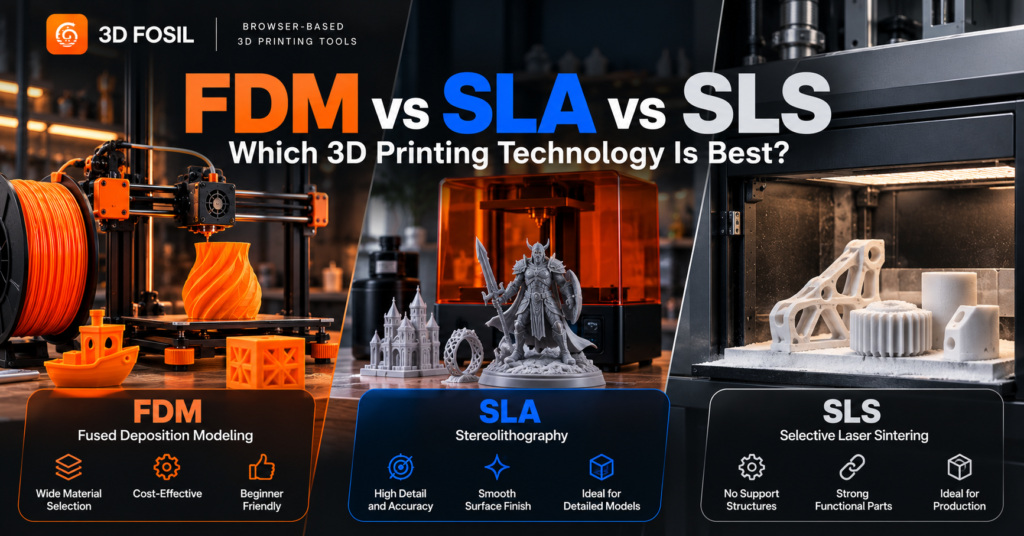
Not all 3D printers work the same way.
Some machines melt plastic filament and deposit it layer by layer. Others use light to transform liquid resin into solid objects. Industrial systems can even use lasers to fuse powdered materials into complex mechanical components.
These different approaches make 3D printing suitable for everything from decorative models to engineering prototypes and production-ready parts.
Three of the most widely recognized technologies are FDM, SLA, and SLS.
But what are the differences between them, and which technology should you choose?
FDM is generally the most accessible option for beginners and everyday functional prints. SLA is often preferred for highly detailed models and smooth surfaces, while SLS is commonly used for complex engineering components and professional production.
The best technology depends on your budget, material requirements, desired surface quality, and intended application.
In this guide, we’ll compare FDM, SLA, and SLS printing, explain how each technology works, and help you determine which one is most suitable for your projects.
What Are FDM, SLA, and SLS 3D Printing?
FDM, SLA, and SLS are three additive manufacturing technologies.
Each creates physical objects from digital 3D models, but they use different materials and manufacturing processes.
FDM: Fused Deposition Modeling
FDM uses thermoplastic filament that is heated and deposited through a nozzle.
The printer builds objects by placing material along programmed paths, typically one layer at a time.
FDM is widely used for desktop 3D printing, functional prototypes, educational projects, and general-purpose manufacturing.
The process is also commonly called FFF, or Fused Filament Fabrication.
SLA: Stereolithography
SLA uses light to selectively cure liquid photopolymer resin.
Traditional SLA printers use a laser to solidify resin in the desired geometry.
Other resin printing systems use projected light or LCD-based masking. These are related vat photopolymerization technologies but are not technically identical to laser-based SLA.
SLA is commonly selected for applications requiring fine details and smooth surfaces.
SLS: Selective Laser Sintering
SLS uses a laser to fuse powdered material, typically polymer powder such as nylon.
The printer selectively fuses regions of a powder bed to form the object.
Unfused powder surrounds the printed parts and supports complex geometries during manufacturing.
SLS is widely used for engineering prototypes, functional components, and industrial production.
FDM vs SLA vs SLS: Quick Comparison
The following table summarizes the main differences between these technologies.
| Feature | FDM | SLA | SLS |
|---|---|---|---|
| Full Name | Fused Deposition Modeling | Stereolithography | Selective Laser Sintering |
| Material | Thermoplastic filament | Liquid photopolymer resin | Polymer powder |
| Manufacturing Process | Material extrusion | Light-based resin curing | Laser powder fusion |
| Surface Finish | Visible layer lines | Generally smooth | Often slightly grainy |
| Fine Detail | Good | Excellent | Good |
| Mechanical Performance | Depends on filament and orientation | Depends on resin formulation | Often suitable for functional components |
| Support Structures | Often required | Usually required | Generally unnecessary for polymer SLS |
| Equipment Cost | Low to moderate | Low to high | Generally high |
| Post-Processing | Support removal and optional finishing | Washing and post-curing | Powder removal and finishing |
| Beginner Accessibility | High | Moderate | Low |
| Typical Applications | Prototypes and general-purpose parts | Detailed models and precision applications | Engineering and production parts |
These are general comparisons. Actual performance depends on the specific printer, material, design, and manufacturing settings.
How Does FDM 3D Printing Work?
FDM printing uses a material extrusion process.
A continuous strand of thermoplastic filament is fed into a heated hotend.
The material softens and is deposited through a nozzle onto the build plate or previously printed layers.
The printer follows toolpaths generated by slicing software.
As the deposited material cools, it solidifies and forms the object.
Step-by-Step FDM Printing Process
- Create or download a 3D model.
- Import the model into slicing software.
- Select the printer and filament.
- Configure layer height, infill, supports, and other settings.
- Generate G-code.
- Transfer the instructions to the printer.
- Print the object layer by layer.
- Remove supports and perform any necessary finishing.
Common FDM Materials
FDM supports a wide range of thermoplastic materials.
Popular options include:
- PLA
- PETG
- ABS
- ASA
- TPU
- Nylon
- Polycarbonate
- Certain fiber-reinforced thermoplastics
Each material has different temperature requirements and mechanical properties.
Advantages of FDM Printing
Affordable equipment
FDM printers are available at relatively accessible prices compared with many industrial additive manufacturing systems.
Wide material selection
Users can choose between rigid, flexible, heat-resistant, and engineering-oriented filaments.
Practical for functional parts
FDM is suitable for many brackets, enclosures, fixtures, and prototypes.
Accessible workflow
Many FDM printers are designed for desktop use and support common model formats and slicing software.
Material efficiency
Material is deposited where needed, although supports and other printed structures can create waste.
Disadvantages of FDM Printing
Visible layer lines
Layer-by-layer extrusion often produces visible surface texture.
Anisotropic mechanical properties
Printed parts may be weaker between layers than within the same layer.
Support requirements
Overhangs and complex shapes may require additional support material.
Warping and adhesion problems
Certain materials can shrink during cooling, causing deformation.
Limited fine detail
Small features may be difficult to reproduce compared with some resin printing technologies.
When Should You Choose FDM?
FDM is a strong option for:
- Beginners
- Hobby projects
- Household accessories
- Functional prototypes
- Mechanical brackets
- Tool holders
- Product development
- Educational applications
If you’re starting with 3D printing, FDM is usually the most practical technology to learn first.
How Does SLA 3D Printing Work?
SLA printing uses a process called vat photopolymerization.
Instead of melting filament, it uses light to cure liquid resin.
In traditional SLA systems, a laser selectively exposes regions of resin, causing the material to polymerize and solidify.
The printer repeats this process to create successive layers.
Step-by-Step SLA Printing Process
- Create or download a 3D model.
- Import the model into compatible preparation software.
- Select the resin and printer profile.
- Orient the model and generate supports.
- Prepare the printing instructions.
- Print the object using controlled light exposure.
- Remove the printed object.
- Wash away uncured resin using the manufacturer’s recommended process.
- Post-cure the object when required.
The exact workflow depends on the printer and resin system.
Common SLA Materials
SLA printers use photopolymer resins.
Available formulations include:
- Standard resin
- Tough resin
- Flexible resin
- High-temperature resin
- Castable resin
- Dental and other specialized resins
Material performance varies significantly between manufacturers and formulations.
Advantages of SLA Printing
Excellent detail reproduction
SLA can produce small features and intricate geometries.
Smooth surface finish
Resin printing generally produces less visible layer texture than typical FDM printing.
Useful for precision applications
Suitable systems can manufacture parts with fine details and controlled dimensions.
Specialized material options
Certain resin formulations are designed for demanding applications.
Disadvantages of SLA Printing
Material handling requirements
Liquid photopolymer resins require careful handling, suitable protective equipment, and appropriate ventilation.
Post-processing
Most resin prints require cleaning and post-curing.
Material limitations
Some standard resins can be brittle or sensitive to environmental exposure.
Additional consumables
Cleaning materials, protective equipment, and replacement components contribute to operating costs.
Support marks
Support structures can leave visible marks on finished parts.
When Should You Choose SLA?
SLA is particularly useful for:
- Miniatures
- Jewelry patterns
- Dental models
- Detailed prototypes
- Small precision components
- Decorative objects
- Models requiring smooth surfaces
If fine detail and surface quality are your primary priorities, SLA may be preferable to FDM.
How Does SLS 3D Printing Work?
SLS uses a powder bed fusion process.
A thin layer of polymer powder is spread across the build area.
A laser selectively heats and fuses regions of the powder according to the model’s geometry.
The process repeats as new powder layers are added.
The surrounding unfused powder supports the printed geometry during manufacturing.
Step-by-Step SLS Printing Process
- Prepare the digital 3D model.
- Import it into compatible preparation software.
- Orient and arrange parts within the build volume.
- Configure the printing process.
- Spread a layer of polymer powder.
- Use a laser to selectively fuse the required regions.
- Repeat the process until the build is complete.
- Allow the powder bed to cool according to the manufacturer’s requirements.
- Remove the parts from the powder.
- Clean and finish the printed components.
SLS printing generally requires specialized equipment and controlled powder-handling procedures.
Common SLS Materials
Common polymer SLS materials include:
- PA12 nylon
- PA11 nylon
- Glass-filled nylon formulations
- Certain flexible polymer powders
- Other specialized engineering polymers
The available materials depend on the printer and processing system.
Advantages of SLS Printing
Complex geometries
SLS can produce intricate shapes without conventional support structures.
Functional mechanical parts
Suitable nylon formulations can provide useful strength and toughness.
Efficient batch production
Multiple parts can be arranged within the build volume.
Design flexibility
SLS can manufacture certain internal structures and assemblies that are difficult to produce with other processes.
No conventional support removal
The surrounding powder supports the geometry during printing.
Disadvantages of SLS Printing
High equipment cost
SLS systems are generally more expensive than consumer FDM and resin printers.
Powder handling
Powder management requires appropriate equipment, training, and safety procedures.
Post-processing
Printed parts must be removed from the powder bed and cleaned.
Surface texture
SLS parts often have a slightly grainy finish.
Thermal management
Cooling and powder reuse can influence production efficiency and material properties.
When Should You Choose SLS?
SLS is well suited to:
- Engineering prototypes
- Complex functional parts
- Small-batch production
- Mechanical assemblies
- Industrial components
- Customized production parts
For businesses manufacturing functional polymer components, SLS can provide significant design and production flexibility.
FDM vs SLA vs SLS: Which Has the Best Print Quality?
Print quality depends on several characteristics.
These include:
- Surface finish
- Feature resolution
- Dimensional accuracy
- Layer consistency
- Material properties
- Printer calibration
FDM Print Quality
FDM can produce high-quality objects, especially with suitable layer heights and well-calibrated equipment.
However, visible layer lines are common.
Very small features may be limited by nozzle diameter and extrusion behavior.
SLA Print Quality
SLA is often preferred for fine details and smooth surfaces.
It is particularly useful for small objects where visual quality and geometric detail are important.
SLS Print Quality
SLS can produce complex and accurate functional components.
However, the surface often has a powder-based texture.
For applications requiring a very smooth finish, additional post-processing may be necessary.
Which Technology Produces the Smoothest Surface?
For many small, detailed objects, SLA generally produces the smoothest surface directly from the printing process.
However, surface finish depends on the machine, material, orientation, and post-processing.
FDM vs SLA vs SLS: Which Is Stronger?
Mechanical performance cannot be determined by printing technology alone.
Material properties, geometry, process settings, and load direction all influence strength.
FDM Strength
FDM parts can be strong when printed with suitable materials and settings.
However, layer adhesion can create directional differences in mechanical performance.
SLA Strength
Resin properties vary considerably.
Standard resins may be relatively brittle, while specialized engineering resins can provide improved toughness or other mechanical characteristics.
SLS Strength
SLS nylon parts can provide useful mechanical performance for functional applications.
Because the process does not rely on deposited filament roads, it can offer different mechanical behavior from FDM.
However, SLS parts are not perfectly isotropic, and properties still depend on build orientation and processing conditions.
Which Is Best for Functional Parts?
FDM is often sufficient for everyday functional prototypes.
SLS is commonly preferred for complex nylon components and certain production applications.
SLA can be appropriate when specialized resin properties or fine geometric details are required.
The correct choice depends on the part’s mechanical and environmental requirements.
FDM vs SLA vs SLS: Cost Comparison
Cost is an important factor when choosing a 3D printing technology.
However, equipment price is only one part of the total cost.
FDM Costs
FDM is generally the most accessible option for beginners.
Typical expenses include:
- Printer purchase
- Filament
- Replacement nozzles
- Build surfaces
- Maintenance
- Electricity
SLA Costs
Resin printing may involve:
- Printer purchase
- Photopolymer resin
- Cleaning supplies
- Protective equipment
- Washing and curing equipment
- Replacement consumables
- Waste handling
SLS Costs
SLS typically involves higher equipment and operational costs.
Expenses may include:
- Industrial printing equipment
- Polymer powder
- Powder management systems
- Post-processing equipment
- Maintenance
- Environmental controls
- Labor
Overall Cost Comparison
| Cost Factor | FDM | SLA | SLS |
|---|---|---|---|
| Entry Equipment Cost | Generally low | Low to moderate | High |
| Material Cost | Often relatively low | Varies by resin | Varies by powder |
| Post-Processing Cost | Usually low | Moderate | Moderate to high |
| Maintenance Complexity | Low to moderate | Moderate | High |
| Home Accessibility | High | Moderate | Low |
These are relative comparisons, not fixed prices.
For professional applications, the cost per finished part should also include labor, machine utilization, post-processing, and failed builds.
FDM vs SLA vs SLS: Which Is Faster?
There is no universal winner for printing speed.
The answer depends on the machine, object geometry, build volume, and number of parts.
FDM Printing Speed
FDM printing time depends on the amount of material extruded and the movement of the print head.
Larger objects and high infill densities generally increase printing time.
SLA Printing Speed
Some resin systems cure an entire layer simultaneously.
This can make batch printing efficient for certain geometries.
Traditional laser-based SLA systems, however, expose geometry differently from masked resin printers.
SLS Printing Speed
SLS can efficiently manufacture multiple parts within a single build.
However, heating, cooling, and powder handling contribute to the total production cycle.
Which Is Fastest for Multiple Parts?
For batch production, resin systems and SLS can be efficient depending on the application.
For individual functional prototypes, FDM may be more practical because of its simpler preparation and post-processing requirements.
The most useful comparison is often total time to a finished, usable part, not just machine printing time.
FDM vs SLA vs SLS: Which Is Best for Beginners?
For most beginners, FDM is the most accessible starting point.
It generally offers:
- Lower equipment costs
- Widely available materials
- Straightforward model preparation
- Large online communities
- Relatively simple post-processing
PLA filament is particularly suitable for learning basic printing concepts.
Resin printing can also be accessible, but it requires more careful material handling and post-processing.
SLS is generally more appropriate for professional or industrial environments.
Which 3D Printing Technology Should You Choose?
The best technology depends on what you want to manufacture.
| Application | Recommended Starting Technology |
|---|---|
| Learning 3D printing | FDM |
| Household accessories | FDM |
| Functional brackets | FDM or SLS |
| Miniatures and figurines | SLA |
| Jewelry patterns | SLA |
| Detailed dental models | Suitable resin printing system |
| Engineering prototypes | FDM, SLA, or SLS |
| Complex nylon components | SLS |
| Small-batch functional production | FDM or SLS |
| Decorative objects | FDM or SLA |
| Large, affordable prototypes | FDM |
These recommendations are starting points.
Material properties, dimensional requirements, production volume, and budget should guide the final decision.
How Does Slicing Differ Between FDM, SLA, and SLS?
All three technologies require digital model preparation.
However, the preparation process differs significantly.
FDM Slicing
FDM slicing typically generates toolpaths that control:
- Nozzle movements
- Extrusion
- Layer height
- Infill
- Supports
- Printing temperatures
- Cooling
The output is commonly G-code.
SLA Preparation
SLA preparation typically involves:
- Model orientation
- Support generation
- Layer configuration
- Exposure or laser processing parameters
- Resin-specific settings
The output format depends on the printer system.
SLS Preparation
SLS preparation often includes:
- Part orientation
- Build volume arrangement
- Part spacing
- Powder and thermal process parameters
- Production planning
Industrial systems may use proprietary preparation software and machine-specific file formats.
Prepare FDM Models Online With 3D Fosil
For users working with filament-based 3D printers, model preparation is an important part of the printing process.
3D Fosil provides browser-based tools for STL analysis and FDM slicing.
Instead of installing traditional desktop slicing software, users can prepare compatible models through a web browser.
Step 1: Upload Your Model
Open 3D Fosil and upload a supported 3D model file.
Step 2: Analyze the Model
Use the STL Analysis tools to review potential printability concerns.
Step 3: Select Your Printer
Choose a supported FDM printer profile that matches your equipment.
Step 4: Configure Your Filament
Select the appropriate material and review the available printing settings.
Step 5: Adjust Slicing Parameters
Configure settings such as:
- Layer height
- Infill
- Wall thickness
- Supports
- Printing temperatures
- Print speed
Step 6: Generate G-code
Prepare the model using the online slicer and generate compatible printing instructions.
Before printing, verify that the output matches your printer and material configuration.
3D Fosil focuses on browser-based model analysis and filament-based slicing workflows. It should not be confused with a universal preparation system for SLA or SLS printers.
Frequently Asked Questions
What is the main difference between FDM, SLA, and SLS?
FDM uses heated thermoplastic filament, SLA uses light to cure liquid resin, and SLS uses a laser to fuse powdered material.
Is SLA better than FDM?
SLA is often better for fine details and smooth surfaces. FDM is generally more accessible and practical for many everyday functional prints.
Is SLS stronger than FDM?
SLS can produce strong functional nylon parts, but strength depends on the material, design, printing parameters, and load direction. Neither technology is universally stronger.
Which 3D printing technology is cheapest?
FDM is generally the most affordable starting point for consumer 3D printing, although total costs depend on the equipment and application.
Which technology produces the most detailed prints?
SLA and related resin printing technologies are often preferred for very fine details, particularly in small models.
Does SLS require supports?
Polymer SLS generally does not require conventional support structures because unfused powder supports the parts during printing.
Can FDM print functional parts?
Yes. FDM can produce functional components when suitable materials, geometry, orientation, and printing settings are used.
Is resin printing stronger than filament printing?
Not necessarily. Mechanical properties depend on the specific resin or filament and the manufacturing conditions.
Is SLS suitable for home use?
SLS is generally less suitable for typical home environments because of equipment costs, powder handling, and operational requirements.
Do all 3D printers use G-code?
No. G-code is common in FDM printing, but other technologies and printer systems may use different instruction formats.
Can I slice FDM models online?
Yes. Browser-based slicers such as 3D Fosil allow users to prepare compatible FDM models without installing traditional desktop slicing software.
Which technology is best for professional manufacturing?
The best technology depends on the application. FDM, SLA, and SLS are all used professionally, but they serve different manufacturing requirements.
Final Verdict: FDM, SLA, or SLS?
FDM, SLA, and SLS each offer different advantages.
Choose FDM if:
- You’re new to 3D printing.
- You want accessible equipment and materials.
- You’re printing everyday functional parts.
- You need a flexible prototyping workflow.
Choose SLA if:
- Fine details are your priority.
- You need smooth surfaces.
- You’re producing miniatures, jewelry patterns, or detailed prototypes.
- You can manage resin handling and post-processing requirements.
Choose SLS if:
- You need complex functional polymer components.
- You’re working with engineering-grade nylon materials.
- You’re producing multiple parts in professional workflows.
- Your application justifies specialized equipment and processing.
No single technology is best for every project.
The right choice depends on your requirements, budget, materials, and manufacturing environment.
For filament-based 3D printing, preparing your model correctly is an essential part of achieving consistent results.
3D Fosil provides browser-based STL analysis and online slicing tools to help simplify FDM print preparation.
Explore 3D Fosil at 3dfosil.com and prepare your next 3D print directly from your browser.