
3D printing starts long before a printer begins laying down its first layer.
Whether you’re creating a functional prototype, printing a replacement part, or working on a personal project, preparing your 3D model is one of the most important steps in achieving a successful print.
A model that looks perfect on screen may still contain geometry issues, unsupported structures, or settings that affect print quality.
That’s where 3D Fosil comes in.
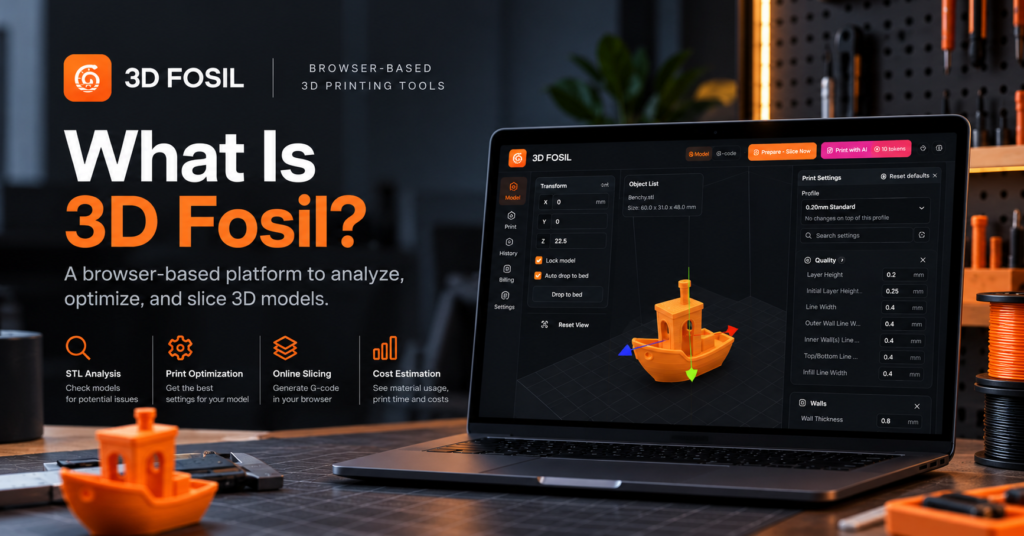
3D Fosil is a browser-based 3D printing platform that combines STL file analysis, print optimization, and online 3D slicing in one place.
Instead of relying on multiple applications to prepare your models, you can analyze files, configure printing parameters, estimate costs, and generate G-code directly from your web browser.
Let’s explore how 3D Fosil works and what it offers.
What Is 3D Fosil?
3D Fosil is an online STL analyzer and 3D slicer designed to simplify the process of preparing 3D models for printing.
The platform brings together tools that help users evaluate model geometry, identify potential printing issues, configure slicing parameters, and prepare printer-ready G-code.
It is designed for a wide range of users, including:
- 3D Printing Enthusiasts: Hobbyists looking for a convenient way to prepare and improve their prints.
- Makers: Individuals creating functional objects, prototypes, and custom designs.
- Engineers: Professionals working with technical models and rapid prototyping.
- Product Designers: Designers who need to evaluate models before physical production.
- 3D Printing Businesses: Teams preparing models and estimating printing requirements.
One of the platform’s main advantages is accessibility.
Because 3D Fosil runs in your browser, you don’t need to install traditional desktop slicing software to access its core tools.
Why Does 3D Model Preparation Matter?
Before a 3D printer can manufacture an object, the digital model needs to be evaluated and converted into instructions the printer can understand.
This process typically involves several steps:
- Checking the model for geometry and printability issues.
- Selecting a compatible 3D printer.
- Choosing the appropriate filament or material.
- Configuring print settings such as layer height, wall thickness, and infill.
- Estimating printing time and material consumption.
- Generating G-code for the printer.
Skipping important checks can lead to failed prints, unnecessary filament consumption, or unexpected results.
For example, a model with thin walls may be difficult to print using a particular nozzle configuration. Similarly, incorrect slicing settings can affect strength, surface quality, and printing time.
3D Fosil helps users address these considerations before starting the printing process.
Key Features of 3D Fosil
1. STL File Analysis
STL is one of the most widely used file formats in 3D printing.
However, an STL file does not automatically guarantee that a model is suitable for printing.
3D Fosil includes an STL analysis tool that helps users evaluate their models before slicing.
Depending on the model and selected printer configuration, analysis can help identify potential concerns related to:
- Model geometry
- Wall thickness
- Overhangs and unsupported areas
- Printability
- Printer compatibility
- Model dimensions
By reviewing potential issues before printing, users can make better decisions about their models and print settings.
Why is this useful?
Discovering a problem before printing is generally less expensive than discovering it after several hours of wasted time and material.
STL analysis provides an additional opportunity to review a model before committing resources to a physical print.
2. Online 3D Slicer
A slicer converts a 3D model into the layer-by-layer instructions required by a 3D printer.
Traditionally, this process involves installing a desktop application.
With the 3D Fosil Online Slicer, users can prepare models directly in their browsers.
The slicing interface provides tools for:
- Importing 3D models
- Positioning and transforming objects
- Selecting printer profiles
- Configuring layer height
- Adjusting wall and infill settings
- Managing printing parameters
- Preparing G-code output
The interface also includes a 3D workspace where users can inspect their models and make adjustments before slicing.
This browser-based approach makes it easier to access essential slicing tools without maintaining a separate desktop installation.
3. Print Settings and Optimization
Successful 3D printing depends on choosing appropriate settings for the model, printer, and material.
A setting that works well for one print may not be suitable for another.
3D Fosil provides configurable printing parameters to help users customize their printing process.
These include settings related to:
Print Quality
Layer height, line width, and other parameters that influence surface finish and detail.
Walls and Shells
Wall thickness and perimeter configurations that affect structural properties.
Infill
Internal structure settings that influence material usage, print time, and strength.
Material Configuration
Settings associated with the selected filament and printer.
Advanced Parameters
Additional slicing controls for users who need more detailed configuration options.
The platform also includes AI-assisted print optimization capabilities designed to help users evaluate printing settings.
These tools support better-informed configuration decisions while allowing users to maintain control over their printing parameters.
4. Printing Cost Estimation
Understanding the cost of a 3D print is important for both hobbyists and businesses.
A print’s cost can depend on several factors, including material consumption, printing duration, and the cost of the selected filament.
3D Fosil provides estimates that help users understand the resources required for a print.
Depending on the available slicing information and configuration, users can review:
- Estimated filament consumption
- Estimated printing duration
- Estimated material costs
- Overall printing cost estimates
For makers, this information can help with planning and material management.
For businesses, it can provide a useful starting point when evaluating production requirements or preparing customer quotations.
These figures are estimates rather than guarantees, as actual results can vary depending on printer performance, material characteristics, and operating conditions.
5. Printer Profiles
Different 3D printers have different hardware specifications and printing requirements.
Build volume, nozzle configuration, supported materials, and other technical characteristics can influence slicing settings.
3D Fosil includes printer profiles that help users configure their printing environment.
Rather than manually entering every printer parameter, users can select a supported printer and work from its available configuration.
This helps simplify the setup process while providing a foundation for further customization.
6. Browser-Based Workflow
One of the defining characteristics of 3D Fosil is its browser-based approach.
Users can access the platform without installing a dedicated desktop application.
This provides several practical advantages:
Accessibility
Open the platform from a compatible browser and access the available tools.
Convenience
Keep STL analysis and slicing within the same environment.
Simplified Setup
Reduce the need to install and maintain separate applications for basic model preparation tasks.
Flexible Workflow
Move between analysis, configuration, and slicing without switching between unrelated software tools.
For users who regularly prepare 3D models, bringing these activities together can make the overall workflow more straightforward.
How Does 3D Fosil Work?
Getting started with 3D Fosil involves a straightforward process.
Step 1: Upload Your 3D Model
Open 3D Fosil and upload a supported 3D model.
The platform supports common 3D model formats, including STL, OBJ, and 3MF in its analysis workflow.
Step 2: Select Your Printer and Material
Choose a supported 3D printer profile and select the filament type you plan to use.
This information helps establish the configuration for subsequent analysis and printing preparation.
Step 3: Analyze Your Model
Run an STL analysis to review potential printing concerns.
Examine the results and determine whether the model or its printing configuration requires adjustments.
Step 4: Configure Your Print Settings
Open the online slicer and adjust the printing parameters according to your requirements.
You can configure settings such as layer height, wall thickness, and other available slicing options.
Step 5: Slice Your Model
Prepare the model for printing using the browser-based slicer.
The slicing process converts the model into instructions based on the selected printer profile and configuration.
Step 6: Download Your G-code
Once the slicing process is complete, download the generated G-code file.
Before printing, verify that the output and selected settings are appropriate for your specific printer and material.
Who Should Use 3D Fosil?
3D Fosil is designed for people who want a more accessible way to prepare 3D models for printing.
Beginners
New users can benefit from having analysis and slicing tools available in a single environment.
The platform provides a practical way to become familiar with model preparation and essential printing parameters.
Hobbyists and Makers
Makers often work with different models, materials, and printing requirements.
3D Fosil helps bring model checks, configuration, and slicing into a consistent workflow.
Engineers and Product Designers
Engineers and designers frequently use 3D printing to test concepts, validate dimensions, and create functional prototypes.
Model analysis and configurable slicing tools can support these preparation tasks.
3D Printing Businesses
Businesses need to consider material consumption, production time, and printing costs.
3D Fosil provides tools that can assist with evaluating these factors before production begins.
Online Slicer vs. Desktop Slicer: What’s the Difference?
Traditional desktop slicers are installed and run locally on a computer.
Browser-based slicers, such as 3D Fosil, provide slicing functionality through a web interface.
Both approaches have their advantages.
Desktop slicers may offer specialized integrations, offline functionality, or advanced features tailored to particular printer ecosystems.
Browser-based tools prioritize accessibility and convenience by reducing the need for local software installation.
3D Fosil focuses on combining model analysis and slicing in a single browser-based workflow.
The best option ultimately depends on your printer, printing requirements, and preferred working environment.
Frequently Asked Questions About 3D Fosil
What is 3D Fosil used for?
3D Fosil is used to analyze 3D models, identify potential printing issues, configure print settings, estimate printing requirements, and generate G-code through an online slicer.
Is 3D Fosil an online STL analyzer?
Yes. 3D Fosil includes an online STL analysis tool that helps users evaluate models before printing.
Can I slice STL files online with 3D Fosil?
Yes. 3D Fosil provides a browser-based slicer that allows users to configure printing settings and generate G-code without installing traditional desktop slicing software.
Does 3D Fosil require installation?
No dedicated desktop application is required to use the browser-based platform. You can access its tools through a compatible web browser.
Does 3D Fosil support different 3D printers?
Yes. The platform includes printer profiles for supported 3D printers, allowing users to select configurations appropriate for their equipment.
Can 3D Fosil estimate printing costs?
Yes. The platform includes estimation features for material consumption, printing duration, and printing costs.
Is 3D Fosil free to use?
3D Fosil offers a free plan alongside paid options. Available features and usage limits depend on the selected plan.
Does 3D Fosil generate G-code?
Yes. The online slicer can generate G-code based on the selected printer profile and slicing configuration.
Start Preparing Your 3D Prints With 3D Fosil
A successful 3D print begins with proper preparation.
From checking model geometry to selecting printing parameters and generating G-code, each step can influence the final result.
3D Fosil brings STL analysis, print optimization, and online slicing together in one browser-based platform.
Whether you’re preparing your first 3D print or working on your next prototype, the platform provides tools to help you approach the process with greater confidence.
Analyze. Optimize. Slice.
Explore 3D Fosil and start preparing your next print.
Get started at 3dfosil.com